Tuesday, 29 March 2022

Search Google Drive folders for creation/modified dates

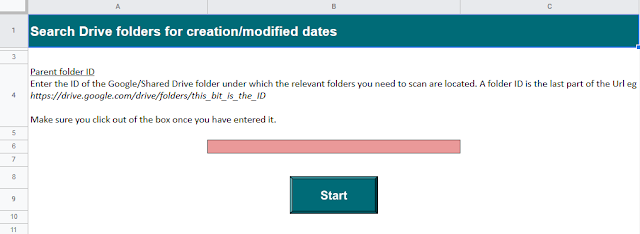
The following Google Apps Script is designed to search through one level of Google Drive folders and extract the following information into a Google Sheet:

  • The folder name as a direct clickable link,
  • The folder creation date,
  • The folder last updated date,
  • The folder ID.
Enter the Parent folder ID and search the folders within

Tuesday, 1 March 2022

Show/hide sections of HTML with jQuery in a Google Sheet

The following code is a mixture of Google Apps Script, JavaScript, HTML and jQuery with the purpose of creating a HTML dialogue box in a Google Sheet that will seamlessly transition between 2 pieces of text at a click of a button.

This was developed as part of an Add-on I built where I needed a welcome page that contained a continue button for the user to click. Rather than having the box close and a new one open however (an action which looked very poor to see) I wanted the existing box to remain open and my new set of text to take it's place.

Tuesday, 8 February 2022

Google Add-on: Bulk Rename Files

Bulk rename Google Drive files quickly and easily with this Add-on. You define exactly what you want to search for in the file name and the text to replace it with.

This is a Google Workspace Add-on designed to work in Google Drive via the Side Panel and is freely available for all here.

Bulk Rename Files interface


Tuesday, 1 February 2022

Google Add-on: Search Drive File Names

It is easy to search for the names of files within Google Drive, but what happens when there are a lot of results that you need to go through?! Scrolling continuously down the page becomes quite clunky and frustrating, so with this tool you can perform that same search in a Google Sheet but have the results collated into the Sheet also, so they are much easier to then work with.

This Google Sheet will contain:

  • a clickable link to the file,
  • the file type,
  • the date it was created,
  • when it was last updated,
  • the folder path where it is stored,
  • the ID of the file.

This is a Google Workspace Add-on designed to work in Google Sheets via the Side Panel and is freely available for all.

Tuesday, 25 January 2022

Archive Sheet data using tickboxes

As of March 2023 'Archive Sheet Data' is now available as a Google Workspace Marketplace Add-on.

The following Google Apps Script is designed to move a row of data from one Google Sheet tab to another when a tickbox has been selected in a given column. The tool was developed to help colleagues with automatically archiving data that had been actioned.

The tool uses an 'onEdit(e) simple trigger' to constantly monitor the Google Sheet for any changes in values. Is it specifically targeted at a tickbox-column only so that it does not archive rows of data on every edit of the Google Sheet.

Archive a row of data by ticking a box

Tuesday, 11 January 2022

How to pass Apps Script data directly into a HTML page

The following Google Apps Script code is designed to create a HTML popup in a Google Sheet and pass some data directly into it so that the popup can display the information.

This was part of a larger project I was working on so I have stripped all of that away here and kept the bare minimum for demo purposes. I already knew how to get the HTML page to run a Function once it had loaded to then access static data from within the Google Sheet, but what was tripping me up here was if that data was coming directly from Apps Script itself - such as an error message from a try/catch.

Display Apps Script code directly in a HTML popup

Tuesday, 28 December 2021

Change file permissions from Editor to Viewer

The following Google Apps Script is designed to change the Google Drive file permissions of a specific user from Editor to Viewer. The function actually came about when needing to end a process where a user had been editing a Google Sheet on a Shared drive that they should only then have Viewer access to. To complicate matters the Apps Script code is running as said user when it needs to reduce their own permissions.

Firstly you will need to enable the Drive API in the Script Editor by going to 'Services' > 'Drive API' > 'Add'. Next we will look to get the permission ID for the email address of the user we want to change access for:

var permissionId = Drive.Permissions.getIdForEmail('email address here').id;

Tuesday, 21 December 2021

Google Add-on: Archive Sheet data

Easily move/archive a row of data from one Google Sheet (tab) to another, within the same file. If you prefer something a bit quicker than cut/paste and with less chance of human-error. It will also remember your individual preferences for each file so it is even quicker to use next time around.

This is a Google Workspace Add-on designed to work in Google Sheets via the Side Panel and is freely available for all. It is a packaged-up version of my previous Archive Sheet data post.

I will be breaking down the new skills I have acquired in future blog posts with the hope of helping you to save time if you do something similar.