Showing posts with label Web App. Show all posts

Tuesday, 21 June 2022

Remove File Access via a Web App

The following Google Apps Script is designed to remove a person's edit access from a Google Drive file via a Web App. The reason for using a Web App in this instance is because removing a person's access to a file whilst they are running Apps Script code typically results in an error (or most certainly the inability to cleanly end the code). In the project I was working on prior to this step the code needs to send some automated emails before finishing with removing the person's access.

This is achieved by some Apps Script code in the Google Sheet we want to remove access to (as this is a template file copied each time somebody completes a Google Form) that creates some hyperlink text to send the Sheet ID to the Web App when the user clicks it. The Web App itself extracts this ID, gets the person's email address from their connected session with the Web App and then executes as an admin account (or basically an account that retains access to the Google Sheet - as it will be filed away somewhere in Google Drive).

All of the complicated extras and fancy formatting has been stripped away from this solution so it focuses on the simple task of connecting with a Web App and removing access, to help make it clearer.
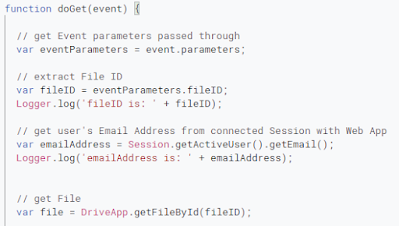
Web App code sample
Web App code sample

Tuesday, 2 February 2021

Create a Zoom meeting via the API

The following blog post is a continuation from the connecting to the Zoom API via OAuth one here (please familiarise yourself with it before proceeding). In addition to this post for getting your Zoom meeting settings via the API.

We have already demonstrated successfully getting an Access Token for authentication from Zoom OAuth and then getting our Zoom meeting settings. Now that we have those items we can go ahead and create a Zoom meeting, as we will do here. You may find this page on creating a meeting via the API useful.

Zoom meeting details in a Google Sheet

Tuesday, 26 January 2021

Get your Zoom meeting settings via the API

The following blog post is a continuation from the connecting to the Zoom API via OAuth one here (please familiarise yourself with it before proceeding).

Now that we are able to successfully get an Access Token after authenticating our account we can use it to call various Zoom APIs. Here we will access user settings in your Zoom account, specifically the meeting settings, and log the results in a Google Sheet. This provides both a way of confirming we have made a successful connection and will allow us to create subsequent Zoom meetings using these settings.

Tuesday, 19 January 2021

Connect to Zoom API with Apps Script and OAuth

The following blog post is about connecting to the Zoom API by creating a Zoom OAuth App and then using a Web App designed in Google Apps Script. Our aim here is to return an Access Token which could then subsequently be used to access Zoom account data (eg your profile, meetings, etc).

Here are some useful links:


Process overview

There are a set of steps that we need to complete in order to achieve successful authentication (connection with our Zoom account via the Zoom API):

  1. Have a user visit a dedicated URL (which comes from our Web App).
  2. This URL is attached to our Zoom OAuth App and upon a user visiting, it returns an Authorisation Code.
  3. Our Web App then uses this Authorisation Code along with the Client ID and Client Secret (generated when we created the Zoom OAuth App) to make another request that finally returns an Access Token, valid for 1 hour.
  4. Further blog posts will explore how we then get Zoom account data, create meetings, etc with the Access Token.

Friday, 4 October 2019

Web app - capture information and add an apps script dropdown

Continuing with the web app project from here there are now some further additions that have been introduced:
  • More fields for capturing information - dropdown list, textarea;
  • A dropdown list populated via Google Apps Script which links to items in a spreadsheet.
Screenshot of webpage with input fields

Friday, 30 August 2019

Adding basic Apps Script and CSS to a web app

This web app project now builds on the foundations we established here and adds the following:
  • A CSS Style Sheet for adjusting layout, colours, font-styles, margins, etc;
  • An event listener to wait for the webpage to fully load before running other functions;
  • An Apps Script function to get the email address of the person visiting the web page.

Screenshot of webpage with CSS styling and email address of visitor

Thursday, 15 August 2019

Getting started with creating a web app

This blog post is about starting with creating a web app from the ground up as I look to develop my skills in this area for possible future projects.

A web app like this sits independently from the other Google Apps meaning it is not bound to Google Sheets or Docs for instance, instead it provides a webpage that can be interacted with directly. At some point it is likely you will want the script to interact with Google Apps in some way so that you can achieve a desired task - this will come in later blog posts.

Code.gs
We begin with the function that is called when the webpage first opens and that will ultimately launch our index.html file. We use 'doGet(e)' to capture the HTTP request for which we can use the 'HtmlService' to then create the HTML webpage.

NOTE: This snippet of code is very much a 'copy and re-use' for each of your web app projects going forwards.
return HtmlService.createTemplateFromFile('index')
.evaluate()
.setSandboxMode(HtmlService.SandboxMode.IFRAME);