 |
| Screenshot of webpage colour |
Tuesday, 24 December 2019
Webpage background colour changer
The following JavaScript code is designed to randomly change the background colour of the webpage each time it is refreshed.

Tuesday, 17 December 2019
Bulk delete records from an SQL Table in Apps Script
The following code combines Google Apps Script and SQL to bulk delete records in an existing SQL Table, from data in a Google Sheet. This naturally follows on from being able to bulk add data in this post.
Rather than getting all of the data from the Google Sheet, this time we are just going to use the Student No which provides a unique value for each record (as it is never repeated). Once we have these values in an array we can loop through each row and use them in our SQL query.
Our query specifies which Table we want to remove the record from and a where condition that has to be met (without this all records would be deleted leaving the Table empty). The where condition in this example is finding a corresponding Student No match.
Rather than getting all of the data from the Google Sheet, this time we are just going to use the Student No which provides a unique value for each record (as it is never repeated). Once we have these values in an array we can loop through each row and use them in our SQL query.
Our query specifies which Table we want to remove the record from and a where condition that has to be met (without this all records would be deleted leaving the Table empty). The where condition in this example is finding a corresponding Student No match.
var sql = "DELETE FROM students "
+ "WHERE StudentNo=" + studentNo;
Tuesday, 10 December 2019
Bulk add data to an SQL Table in Apps Script
The following code combines Google Apps Script and SQL to bulk insert a Google Sheet of data into an existing SQL Table. This post improves upon this one for adding a single piece of ad-hoc data.
This time we have a Google Sheet of data with columns matching those in the students Table. We start by collecting this data into an array that we can loop through to push the values into an SQL query. When we create the query we construct it slightly differently however as we need to include variables rather than static text (as their value will change for each row when the script loops through).
 |
| Screenshot of Google Sheet data for SQL Table |
var sql = "INSERT INTO students (StudentNo, FirstName, LastName, Shoesize) "
+ "VALUES ('" + studentNo + "','" + firstName + "','" + lastName + "','" + shoesize + "')";
Tuesday, 3 December 2019
Get data from an SQL Table in Apps Script
The following code combines Google Apps Script and SQL to query an existing Table to then copy the data into a Google Sheet. This post follows on from this one for adding data to an SQL Table.
This time we make use of a 'select' SQL query to pickup all columns (*) from the students Table. We use 'executeQuery' to run it as we are returning a set of data from the database.
We make use of a method called 'offset' which is detailed more in this blog post which allows us to iterate from the first column across to the last, then move down each row. Then 'getString' retrieves a string value from the Table's specified row and column which we can then enter into the cell.
This time we make use of a 'select' SQL query to pickup all columns (*) from the students Table. We use 'executeQuery' to run it as we are returning a set of data from the database.
var studentsTableData = stmt.executeQuery("SELECT * FROM students");Next we collect some spreadsheet data and select our starting cell where the first row of data will be inserted from - A2 in this instance. We then create a 'while' loop that goes through row-by-row for each of the 4 columns and inserts data from the students Table.
We make use of a method called 'offset' which is detailed more in this blog post which allows us to iterate from the first column across to the last, then move down each row. Then 'getString' retrieves a string value from the Table's specified row and column which we can then enter into the cell.
var newCell = startCell.offset(row, i);
var value = studentsTableData.getString(i+1);
newCell.setValue(value);
Tuesday, 26 November 2019
Add data to an SQL Table in Apps Script
The following code combines Google Apps Script and SQL to insert an ad-hoc entry (row of data) into an existing Table. This post follows on from this one for creating an SQL Table in Apps Script.
As before we begin by creating a statement for sending SQL code to the database. Then we can 'execute' the given SQL statement to 'insert into' the existing students Table the values provided.
As before we begin by creating a statement for sending SQL code to the database. Then we can 'execute' the given SQL statement to 'insert into' the existing students Table the values provided.
var student = stmt.execute('INSERT INTO students'4 values have been provided to match the 4 columns contained within the students Table:
+ " VALUES ('456789', 'Donald', 'Duck', '9');"
);
- StudentNo - 456789
- FirstName - Donald
- LastName - Duck
- Shoesize - 9
Tuesday, 19 November 2019
Create an SQL Table in Apps Script
The following code combines Google Apps Script and SQL to create a Table in an existing database.
db.gs
To begin we need to establish a remote connection to the database via the 'JDBC Service' to which we pass a number of credentials.
createStudentsTable.gs
With the connection made we next need to create a statement for sending SQL code to the database.
db.gs
To begin we need to establish a remote connection to the database via the 'JDBC Service' to which we pass a number of credentials.
var db = Jdbc.getConnection('jdbc:mysql://' + dbAddress + ':3306/' + dbName, dbUser, dbPassword);
createStudentsTable.gs
With the connection made we next need to create a statement for sending SQL code to the database.
var stmt = db.createStatement();Then we can 'execute' the given SQL statement which creates a Table called students containing 4 columns and their datatypes.
var studentsTable = stmt.execute('CREATE TABLE students'
+ ' (StudentNo int, FirstName varchar(255), LastName varchar(255), Shoesize varchar(255));'
);
Tuesday, 12 November 2019
How to use 'offset' in a Google Sheet
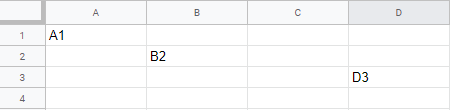
The following Google Apps Script is a simple example of using 'offset' to return a new range from one previously given. So if we take cell A1 for instance and offset by 1 row & 1 column we would end up with cell B2. If we take cell A1 and offset by 2 rows & 3 columns we would end up with D3.
 |
| Screenshot of Google Sheet with values from offset function |
Wednesday, 6 November 2019
Count word frequency within text
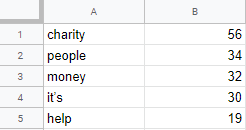
The following Google Apps Script is designed to take a chunk of text (pasted into the Google Sheet) and then count how many times each word appears within that text, displaying the results in a hierarchical list in another sheet.
The script also makes use of Stopwords which are designed to be ignored from the main body of text and not counted, so like 'they', 'are', 'a' and 'the' are all commonly used English words which would unnecessarily be at the top of the results list each time. The list of Stopwords can be adjusted as required if you want to add/remove some.
The script also makes use of Stopwords which are designed to be ignored from the main body of text and not counted, so like 'they', 'are', 'a' and 'the' are all commonly used English words which would unnecessarily be at the top of the results list each time. The list of Stopwords can be adjusted as required if you want to add/remove some.
 |
| Screenshot of example word count results |
Subscribe to:
Posts (Atom)