 |
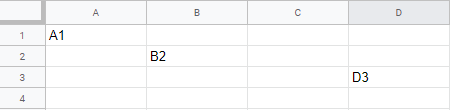
| Screenshot of Google Sheet with values from offset function |
Tuesday, 12 November 2019
How to use 'offset' in a Google Sheet
The following Google Apps Script is a simple example of using 'offset' to return a new range from one previously given. So if we take cell A1 for instance and offset by 1 row & 1 column we would end up with cell B2. If we take cell A1 and offset by 2 rows & 3 columns we would end up with D3.

Wednesday, 6 November 2019
Count word frequency within text
The following Google Apps Script is designed to take a chunk of text (pasted into the Google Sheet) and then count how many times each word appears within that text, displaying the results in a hierarchical list in another sheet.
The script also makes use of Stopwords which are designed to be ignored from the main body of text and not counted, so like 'they', 'are', 'a' and 'the' are all commonly used English words which would unnecessarily be at the top of the results list each time. The list of Stopwords can be adjusted as required if you want to add/remove some.
The script also makes use of Stopwords which are designed to be ignored from the main body of text and not counted, so like 'they', 'are', 'a' and 'the' are all commonly used English words which would unnecessarily be at the top of the results list each time. The list of Stopwords can be adjusted as required if you want to add/remove some.
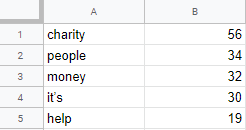 |
| Screenshot of example word count results |
Monday, 28 October 2019
Array - sort 2-D items each with a value
The following Google Apps Script builds on this previous blog post by introducing sorting for a 2-D array that contains items with a numerical value. As before we want to sort the array in ascending order based on the numerical value, but also keep the text associated with it (which in this example is part of a larger script that counts the frequency of words in a piece of text).
var myArray = [["means", 5.0], ["you’ve", 3.0], ["help", 19.0], ["they", 17.0]];All we ultimately need to do in the sortNumbers function is define which part of the array the 'sort' needs to look at. As an array starts at zero that would give us the text value which is not what we want, so instead we specify that a and b should use position one for the numerical value. In this example we have logged the value to verify the correct element of the array is being called.
function sortNumbers(a, b) {So in this example we end up with the result.
Logger.log(a[1]);
Logger.log(b[1]);
return a[1] - b[1];
}
[[you’ve, 3.0], [means, 5.0], [they, 17.0], [help, 19.0]]
Sunday, 27 October 2019
Array - sort simple numerical values
The following Google Apps Script is designed to take an array of numerical items and sort them in ascending order (from lowest to highest).
We begin with an array of values and call a function named sortNumbers.
We begin with an array of values and call a function named sortNumbers.
var myArray = [40, 100, 1, 5, 25, 10];The sortNumbers function takes 2 values as input parameters and sorts them according to the returned (negative, zero, positive) value. If the result is negative a is sorted before b. If the result is positive b is sorted before a. If the result is 0 no changes are done with the sort order of the two values.
myArray.sort(sortNumbers);
function sortNumbers(a, b) {So in this example we end up with the result.
return a - b;
}
[1.0, 5.0, 10.0, 25.0, 40.0, 100.0]Here is a link to a version with a 2-D array of items each with a value.
Monday, 7 October 2019
Google Doc - add hyperlink text
The following Google Apps Script is designed to add some hyperlink text to an existing Google Doc - the BBC news website in this example.
It makes use of 'setLinkUrl' when appending a paragraph of text.
 |
| Screenshot of Google Doc text with hyperlink |
It makes use of 'setLinkUrl' when appending a paragraph of text.
docBody.appendParagraph('BBC news link').setLinkUrl('https://www.bbc.co.uk/news');
Saturday, 5 October 2019
While loop with a Sleep and Toast
The following Google Apps Script is a simple 'while' loop that pops up a 'toast' message every 5 seconds by making use of 'Utilities.sleep' to pause the script.
This was created as part of some testing for another script designed to bulk move files between Google Drive folders. Without the toast notification it was difficult to determine the progress being made, so adding it in allowed for the name of the file last copied to be displayed to the user. This script removes all of the extra features and shows the basic while loop and toast.
This was created as part of some testing for another script designed to bulk move files between Google Drive folders. Without the toast notification it was difficult to determine the progress being made, so adding it in allowed for the name of the file last copied to be displayed to the user. This script removes all of the extra features and shows the basic while loop and toast.
 |
| Screenshot of toast notification in Google Sheet |
Friday, 4 October 2019
Web app - capture information and add an apps script dropdown
Continuing with the web app project from here there are now some further additions that have been introduced:
- More fields for capturing information - dropdown list, textarea;
- A dropdown list populated via Google Apps Script which links to items in a spreadsheet.
 |
| Screenshot of webpage with input fields |
Tuesday, 1 October 2019
Create alphabetised folders in Google Drive
The following Google Apps Script is designed to bulk create folders from a Google Sheet and to arrange them into alphabetised folders within Google Drive, by extracting the first letter of their surname.
If a suitable alphabetised folder does not exist in Google Drive, then one is created. The script also adds the created folder to an 'Everybody' folder so that there is a single area with all the folders listed in.
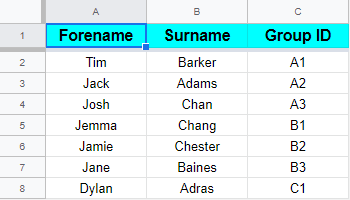 |
| Screenshot of example Google Sheet data for creating folders |
If a suitable alphabetised folder does not exist in Google Drive, then one is created. The script also adds the created folder to an 'Everybody' folder so that there is a single area with all the folders listed in.
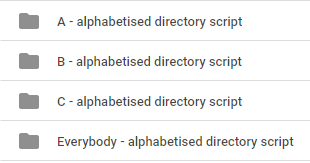 |
| Screenshot of Google Drive folder layout |
Subscribe to:
Posts (Atom)