Saturday, 5 October 2019

While loop with a Sleep and Toast

The following Google Apps Script is a simple 'while' loop that pops up a 'toast' message every 5 seconds by making use of 'Utilities.sleep' to pause the script.

This was created as part of some testing for another script designed to bulk move files between Google Drive folders. Without the toast notification it was difficult to determine the progress being made, so adding it in allowed for the name of the file last copied to be displayed to the user. This script removes all of the extra features and shows the basic while loop and toast.
Screenshot of toast notification in Google Sheet

Friday, 4 October 2019

Web app - capture information and add an apps script dropdown

Continuing with the web app project from here there are now some further additions that have been introduced:
  • More fields for capturing information - dropdown list, textarea;
  • A dropdown list populated via Google Apps Script which links to items in a spreadsheet.
Screenshot of webpage with input fields

Tuesday, 1 October 2019

Create alphabetised folders in Google Drive

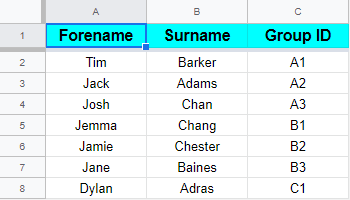
The following Google Apps Script is designed to bulk create folders from a Google Sheet and to arrange them into alphabetised folders within Google Drive, by extracting the first letter of their surname.
Screenshot of example Google Sheet data for creating folders

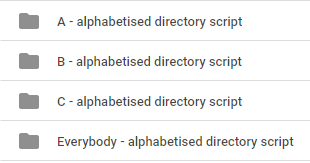
If a suitable alphabetised folder does not exist in Google Drive, then one is created. The script also adds the created folder to an 'Everybody' folder so that there is a single area with all the folders listed in.
Screenshot of Google Drive folder layout

Friday, 27 September 2019

Bulk send emails from Google Sheet

The following Google Apps Script is designed to loop through each row of a Google Sheet and send an email containing information from it. This means you can send personalised emails with ad-hoc information for each recipient quickly.
Screenshot of spreadsheet data used for creating emails

Thursday, 26 September 2019

Search Google Calendar date range for specific events

The following Google Apps Script builds on this previous post for searching Google Calendar for event details by expanding the search scope to a date range and including search criteria to narrow down the results.

There are only a couple of extra lines to add since we did most of the work in the previous blog post.
var options = {search: 'Test'};
var allEvents = calendar.getEvents(startDate, endDate, options);
So this time we can specify further criteria when getting events - like searching for the text Test and providing a start/end date.

Sunday, 15 September 2019

Remove HTML tags in a cell by a regex

The following Google Apps Script is designed to remove all HTML tags within the content of a cell by using a regular expression (regex). It was developed as a more advanced version of this HTML email body blog post in that it could dynamically remove various instances of HTML tags used (eg <font></font>, <br />, <strong></strong>) all in one go.
Screenshot of cell containing HTML tags and text

The regex uses 'replace' to identify the HTML tags and remove then (or technically replace them with nothing):
var cleanContent = cell.replace(/<[^>]+>/mg,"");

Saturday, 14 September 2019

Split single cell contents with new line

The following Google Apps Script is designed to separate the contents of a cell that have been entered on a new line (by pressing Alt + Enter in Windows). In this example there are 3 email addresses in the one cell that we want to 'split' up so we can extract each one individually.
Screenshot of cell with content added via a new line

Saturday, 7 September 2019

Bulk rename files in Google Drive

As of February 2022 this tool is now available as a Google Workspace Marketplace Add-on.

The following Google Apps Script is designed to automate bulk renaming of multiple files within a single Google Drive folder. It has been developed as a Google Sheet with flexibility towards entering your own search pattern and replacement string as you see fit.

Download
Bulk rename files in Google Drive download (please use 'File' > 'Make a copy' for your own version).
As of February 2022 this is now available as a Google Workspace Marketplace Add-on.